
TL;DR
Graduate students need headshots that look credible, approachable, and early-career ready, not overly senior or artificial. A good AI headshot should match the target channel, keep edits realistic, and support a consistent personal brand across LinkedIn, career portals, resumes, and portfolios.
A polished photo can make a new graduate look prepared before a recruiter reads a single line of a resume. An AI headshot for graduate students entering the job market helps solve a common problem: career-ready images are needed fast, but professional studio sessions can be costly, hard to schedule, or too formal for early-career roles. Tools such as Looktara can help students and recent graduates create professional profile images that feel credible without looking stiff.
AI headshot: an AI-generated or AI-enhanced portrait designed to resemble a professional photo for career profiles, resumes, university portals, portfolios, and social platforms.
Key insight: The best graduate headshot does not try to make a 23-year-old look like a senior executive. It signals readiness, trust, and fit for the role being pursued.
Table of Contents
Why graduate students need a career-ready headshot in 2026
Graduate students need a career-ready headshot because hiring now begins across digital profiles, not only resumes. SERP research for this topic shows 244,000,000 results, which reflects how crowded the conversation around AI, student careers, and professional identity has become.
The 2026 graduate job market is also shaped by anxiety about AI and entry-level hiring. One top-ranking 2026 article, What it's like to enter the job market in the middle of an AI revolution, focuses on recent graduates facing a tougher market. Another 2025 ranking article covers how AI is changing student career readiness. Neither focuses deeply on the practical image choices graduates need for LinkedIn, career portals, internships, and portfolio pages.
A headshot gives recruiters a fast trust signal. It should support the resume, not distract from it. For most graduate students, that means clean lighting, simple clothing, natural expression, and a background that looks professional but not corporate-heavy.
- LinkedIn: approachable, clear, and aligned with the target field
- University career portals: neutral, tidy, and easy to verify
- Internship applications: energetic but polished
- Portfolio pages: more personal, especially for design, writing, tech, and media roles
- Resume attachments where accepted: conservative, cropped, and distraction-free
A graduate headshot also helps keep profiles consistent. A student who uses one visual identity across LinkedIn, a resume profile, and a portfolio page looks organized. That consistency can be supported with related assets, such as a polished resume headshot generator for application materials and a branded LinkedIn post image generator for professional updates.
What makes an AI headshot look credible for early-career roles?
A credible AI headshot for early-career roles looks realistic, current, and aligned with the graduate's actual professional presence. The goal is not glamour, status, or heavy transformation; the goal is a believable image that could match an interview call.
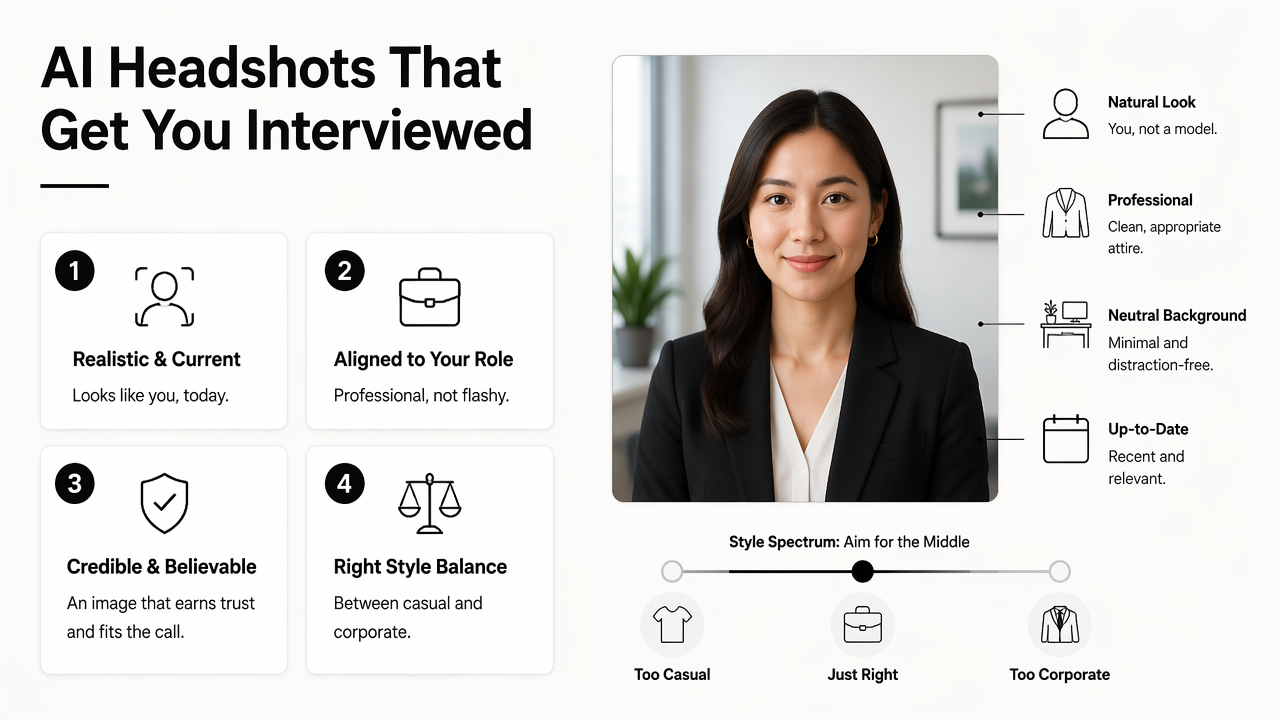
Graduate students should aim for a style that sits between casual social media photos and formal executive portraits. This middle ground matters because overdone photos can create a mismatch between the profile and the person who appears in a video interview.
Best headshot styles by job-search channel
| Channel | Best style | Avoid | Why it works |
|---|---|---|---|
| Smart casual or business casual, clean background | Heavy filters, dramatic studio lighting | Signals approachability and professionalism | |
| University career portal | Neutral outfit, direct eye contact, plain backdrop | Fashion poses or cropped group photos | Helps employers quickly identify the candidate |
| Internship application | Bright, friendly, slightly energetic | Executive styling that feels too senior | Shows readiness without exaggerating experience |
| Portfolio website | Field-specific style, creative but clear | Busy backgrounds that compete with work samples | Supports a personal brand without stealing focus |
| Dating or creator profile crossover | Natural expression, authentic edit | Corporate blazer when the context is personal | Keeps the image believable across platforms |
A good AI result should preserve face shape, skin texture, hair details, and age cues. Small improvements are fine. A different jawline, unfamiliar hairstyle, or unrealistic skin finish can damage trust.
Practical rule: If classmates, professors, or interviewers would not recognize the person in the image, the headshot has gone too far.
The Looktara platform is most useful when the goal is a polished but still natural profile image. For students building a wider personal brand, a headshot can pair with visual materials such as a website hero image for a portfolio or personal landing page.
How should graduate students create an AI headshot for the job market?
Graduate students should create an AI headshot by starting with realistic source photos, choosing a role-appropriate style, reviewing the output for accuracy, and applying the image consistently across career profiles.
- Choose recent source photos. Use clear, well-lit images where the face is visible and not covered by sunglasses, masks, or heavy shadows.
- Match the target industry. Finance, consulting, education, healthcare, design, software, and media each expect slightly different visual cues.
- Keep clothing simple. Solid colors, neat collars, sweaters, blouses, and simple jackets work better than loud prints.
- Select a believable background. Soft gray, warm indoor, campus-neutral, or office-style backgrounds are usually safer than luxury interiors.
- Check identity accuracy. Hairline, face shape, eye spacing, skin tone, and expression should still look familiar.
- Crop for each platform. LinkedIn favors a close crop, while a portfolio page can use more shoulder and background space.
- Save alternates. Keep one formal version, one friendly version, and one field-specific version.
The strongest prompt is specific but not dramatic. A useful direction might describe a recent graduate in business casual clothing, soft natural lighting, a neutral background, and a friendly professional expression. Words like "CEO," "luxury," or "magazine cover" usually push the result too far for entry-level roles.
Recommended prompt ingredients
- Role context: "recent graduate applying for analyst roles" or "master's student applying for UX internships"
- Wardrobe: "navy sweater," "simple blazer," "collared shirt," or "clean neutral top"
- Lighting: "soft daylight" or "studio-style natural lighting"
- Expression: "confident and approachable smile"
- Background: "neutral office background," "plain gray backdrop," or "subtle campus-inspired setting"
Students working on entrepreneurship or freelance projects may need more than one visual asset. A headshot can sit beside a pitch deck slide design for student founders or a logo concept generator for early personal brands.
Which mistakes make graduate AI headshots look unprofessional?
Graduate AI headshots look unprofessional when the image seems artificial, mismatched to the role, or inconsistent with the person's real appearance. Hiring teams may not reject a candidate because of one awkward image, but a poor headshot can weaken a first impression.
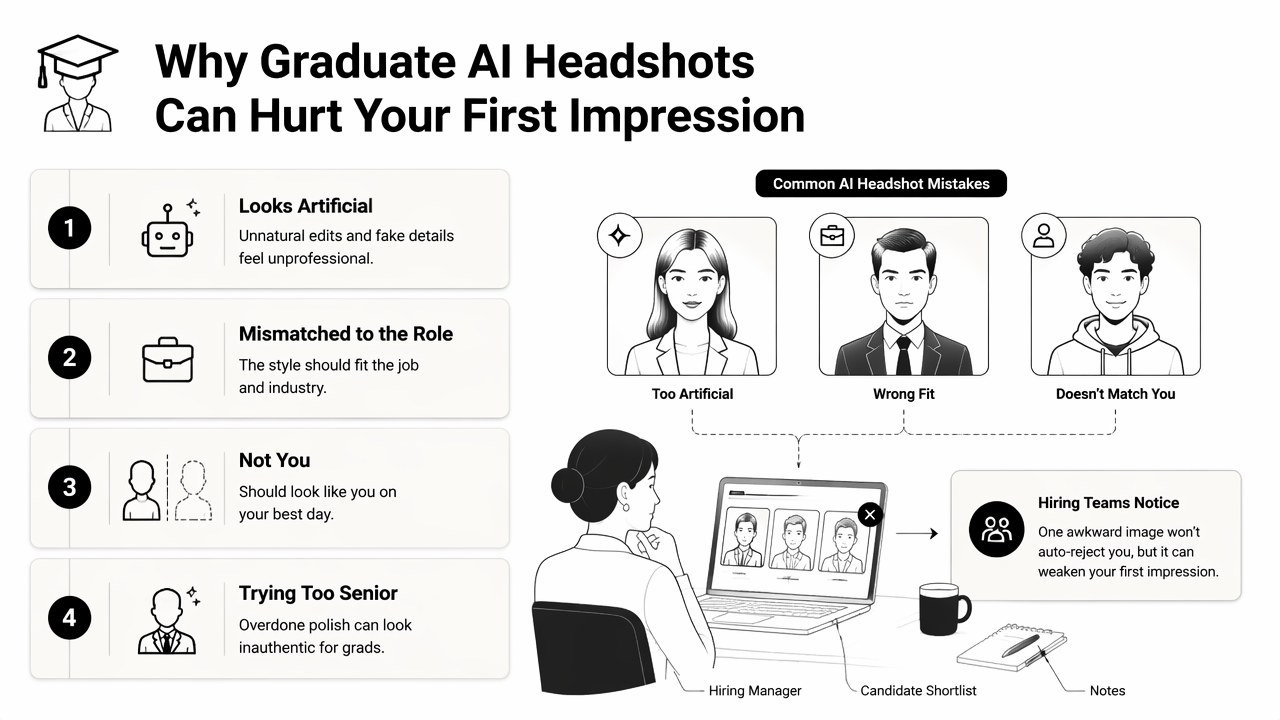
The most common error is trying to look too senior. A recent graduate in a dramatic boardroom pose can appear less authentic than a candidate in a clean, simple portrait. Another mistake is using the same image everywhere without considering context.
Common headshot errors and better fixes
| Mistake | Why it hurts credibility | Better choice |
|---|---|---|
| Overly smooth skin | Looks synthetic or heavily edited | Keep natural texture and normal lighting |
| Executive-only styling | Creates a mismatch for internships or entry-level roles | Use smart casual or modest business casual |
| Busy background | Pulls attention away from the face | Choose plain or softly blurred settings |
| Cropped group photo | Looks rushed and informal | Generate or choose a single-person portrait |
| Unrecognizable edit | Can create distrust during interviews | Preserve real facial features |
| Wrong mood | Serious expression can feel cold for early-career roles | Use calm confidence or a slight smile |
A second problem is ignoring platform norms. A portfolio page can allow more personality than a university career portal. LinkedIn sits in the middle, where warmth and clarity usually outperform overly formal styling.
Ethical use also matters. An AI headshot should improve presentation, not invent credentials, age, workplace status, or identity markers. The same principle applies to resumes and portfolios: polish is acceptable, misrepresentation is not.
Trust test: A headshot should make the interview feel familiar, not surprising.
What to expect from AI headshots in 2027
AI headshots in 2027 will likely become more personalized, more platform-aware, and more closely tied to the rest of a graduate's career materials. The trend is moving away from generic "professional photo" outputs and toward role-specific personal branding.
Search results already show strong interest in AI and career readiness. Top-ranking pages cover AI's impact on students, free AI headshot generation, and the broader graduate job market. The missing piece is practical guidance that connects image style to hiring context.
In the next phase, students can expect tools to produce coordinated career visuals: a headshot for LinkedIn, a banner for a portfolio, a presentation image for a startup pitch, and social posts for professional updates. That matters because personal branding is no longer limited to executives or influencers.
The best systems will likely focus on three qualities:
- Accuracy: preserving the person's real appearance
- Context: matching the visual style to the platform and job type
- Consistency: keeping the same professional identity across channels
With Looktara, graduate students can think beyond a single profile image and build a small set of career visuals. For example, a headshot can pair with a portfolio or landing page banner when applying for internships, freelance projects, research roles, or founder programs.
A simple 2026 strategy still holds up for 2027: create one polished primary headshot, one warmer networking image, and one field-specific version. Then review all three every semester, after a major haircut, new role, graduation ceremony, or career direction change.
FAQ about graduate AI headshots
Graduate AI headshots work best when they support the job search without making the candidate look artificial or overqualified. These answers cover the most common practical questions for students entering the workforce.
Should a graduate student use an AI headshot on LinkedIn?
Yes, a graduate student can use an AI headshot on LinkedIn if the image is realistic, current, and aligned with the target field. The photo should look like the person who will appear in interviews. A clean background, natural expression, and modest professional clothing usually work better than dramatic studio effects.
Can an AI headshot be used for university career portals?
An AI headshot can work for university career portals when it looks neutral and accurate. Career portal photos should be more conservative than creator profiles or portfolio portraits. A plain background, direct eye contact, and simple clothing help employers recognize the applicant quickly and focus on qualifications.
What should a graduate avoid in an AI-generated professional photo?
A graduate should avoid edits that change identity, age, skin tone, facial structure, or hair in a major way. The image should not suggest seniority, wealth, or workplace status that does not match the applicant's experience. Heavy retouching, unrealistic backgrounds, and stiff executive poses can make the profile feel less trustworthy.
How many headshot versions should a new graduate keep?
A new graduate should keep three strong versions: one formal image for applications, one approachable image for LinkedIn networking, and one field-specific image for portfolios or creator profiles. This gives enough flexibility without creating an inconsistent personal brand across search results, social profiles, and career platforms.
Conclusion
An AI headshot for graduate students entering the job market should make a candidate look prepared, approachable, and real. The strongest image choices are simple: accurate facial details, clean lighting, appropriate clothing, and a style matched to the channel.
The next step is practical. Graduate students can select three current photos, define the target role, generate a small set of polished options with Looktara, and choose the version that would feel natural on LinkedIn, a career portal, and a portfolio page. For more career-ready visual assets, visit looktara.com and build a consistent professional presence before the next application cycle begins.
Generated by EarlySEO.com