
TL;DR
AI-generated press portraits work best when they look credible, crop cleanly, and match a brand's media kit. The safest workflow is to create several polished variations, export high-resolution files, and keep a realistic human expression for journalists, investors, and profile pages.
A press page portrait often gets judged before a bio, launch note, podcast pitch, or founder story gets read. An AI photo generator for press page portraits can create polished, media-ready headshots without a studio session, but the output must meet stricter standards than a casual profile image. AI photo generator: software that creates or edits images from prompts, uploaded photos, or style settings using artificial intelligence. For professionals building a public-facing image set, Looktara helps turn portrait direction into consistent brand visuals that fit LinkedIn-style profiles, press pages, and campaign assets.
Table of Contents
What is an AI photo generator for press page portraits?
An AI photo generator for press page portraits is a tool that creates professional-looking headshots for media kits, founder bios, speaker pages, launch announcements, and public profiles. The best outputs preserve likeness, use clean lighting, avoid distracting backgrounds, and export files large enough for digital publications and cropped social previews.
Research on text-to-image systems by Jonas Oppenlaender in The Creativity of Text-to-Image Generation examined how prompt-based tools support visual creation. For press portraits, that creativity needs guardrails. A generated portrait must look like a credible person, not a fantasy character or stock-photo composite.
Getty Images, defined in research data as a visual media company and supplier of stock images, editorial photography, video, and music, shows why media assets need consistency. Press pages exist to make a journalist's job easier, so portraits should download quickly, crop predictably, and match the rest of the media kit.
Press portrait use cases and file expectations
| Use case | Best portrait style | File priority |
|---|---|---|
| Founder press page | Natural expression, neutral background | High-resolution JPEG and PNG |
| Podcast guest page | Friendly crop, shoulders visible | Square and vertical crops |
| Product launch announcement | Brand-aligned lighting and wardrobe | Web-optimized file size |
| Investor or speaker bio | Formal but approachable expression | Clean background and sharp face detail |
| Social media profile | Tight crop with eye contact | Platform-safe dimensions |
Key insight: a good press portrait is not the most dramatic image; it is the easiest image for an editor, event team, or partner to publish without extra work.
A related brand system may also include launch visuals, pitch materials, and social previews. Teams that need visual consistency beyond portraits often pair headshots with assets such as a fitness Shopify pitch deck slide AI generator for presentation-ready founder stories.
How should media-ready AI portraits be created?
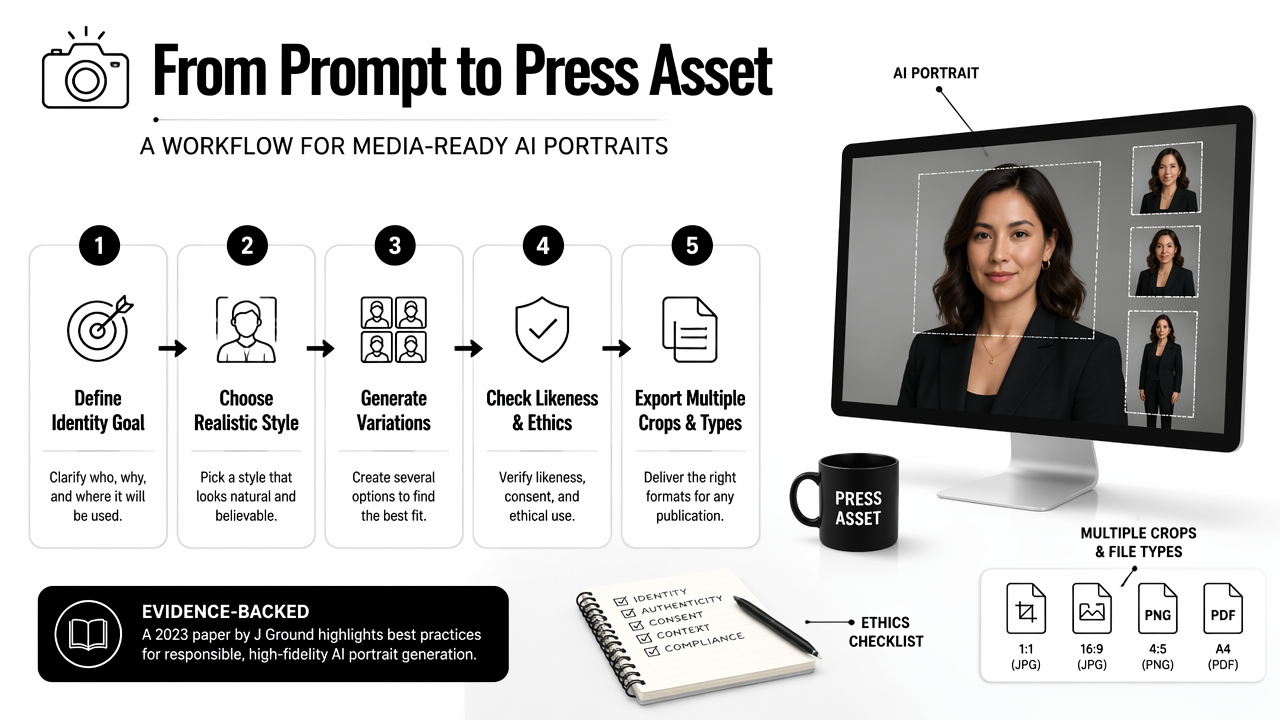
Media-ready AI portraits should be created by starting with a clear identity goal, choosing a realistic style, generating several variations, checking likeness and ethics, then exporting multiple crops and file types. The strongest workflow treats the portrait as a press asset, not a decorative image.
A 2023 paper by Jürgen Rudolph, Shannon Tan, and Samson Tan, War of the chatbots, examined the wider impact of generative AI systems. That broader context matters because public portraits can influence trust, identity, and professional credibility.
PhotoAid is described in the research data as a company working with digital image processing and facial recognition for biometric passport use. Press portraits do not need passport-level rules, but the comparison is useful: face clarity, accurate proportions, and lighting still matter.
A practical creation workflow
- Define the press role: founder, executive, author, speaker, creator, freelancer, or job seeker.
- Select a visual tone: editorial, warm professional, modern startup, corporate, or creative.
- Use clear source photos: face-forward images with natural lighting and no heavy filters.
- Generate variations: create options with different crops, jackets, backgrounds, and expressions.
- Check identity accuracy: reject images with changed facial structure, altered age, or unrealistic skin.
- Export for media: save square, vertical, and wide versions for press pages and social thumbnails.
Strong prompts use concrete direction. A useful prompt might specify "natural studio lighting, neutral grey background, shoulders visible, calm confident expression, editorial headshot, realistic skin texture." Vague prompts often create images that feel generic.
Prompt details that improve editorial quality
- Expression: calm, friendly, focused, or confident.
- Background: white, warm grey, soft office, subtle brand color, or blurred studio.
- Wardrobe: solid colors, simple blazer, neat shirt, or creator-style casual clothing.
- Lighting: soft front light, natural window light, or balanced studio light.
- Crop: head and shoulders, chest-up, square profile, or vertical speaker image.
For social distribution, portrait systems can be extended into platform-specific creative. A founder portrait used on a press page may also support a launch thread using a fitness Shopify X post AI generator, as long as the portrait remains consistent across placements.
What makes an AI portrait press-page ready?
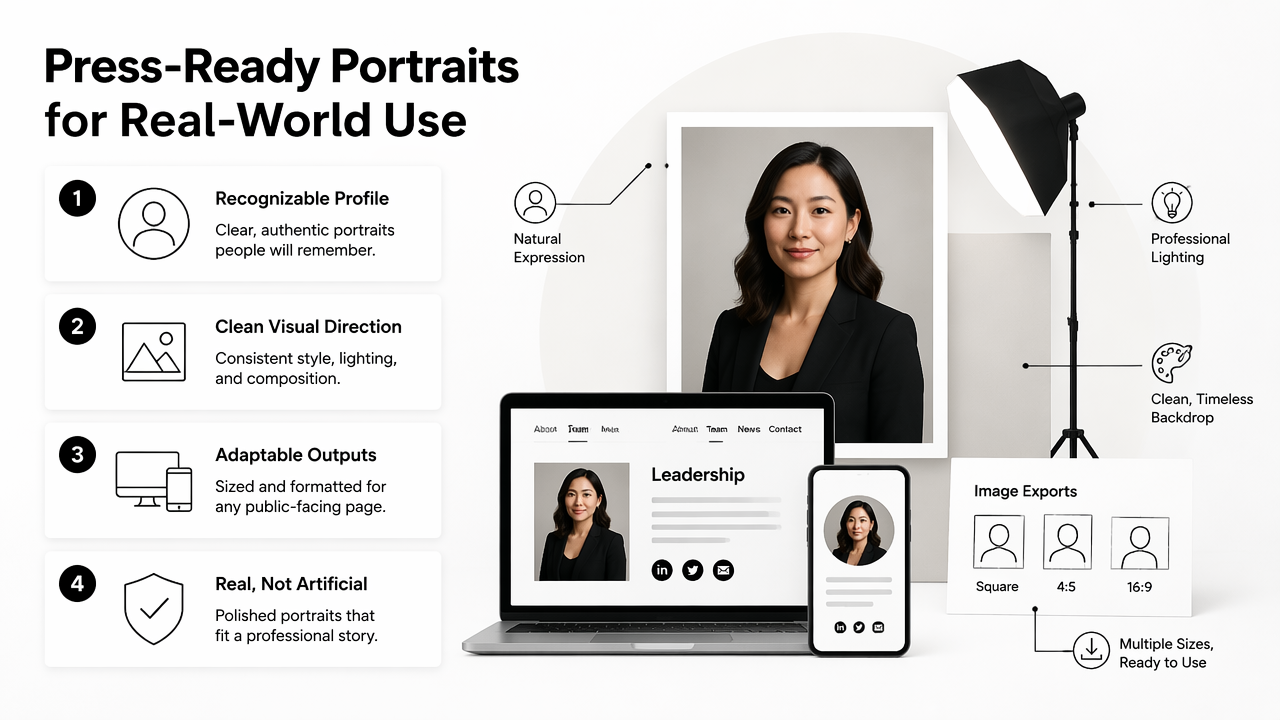
An AI portrait becomes press-page ready when it passes four checks: recognizable likeness, clean composition, publication-friendly file quality, and a consistent brand mood. A beautiful image can still fail if it crops poorly, looks over-edited, or cannot be downloaded by a media contact.
Press pages usually serve busy readers. Journalists, event organizers, podcast producers, and partners need an image that fits their format without negotiation. That means generous headroom, visible shoulders, and no objects blocking the face.
Human-centered AI research by Galena Pisoni, Natalia Díaz-Rodríguez, and Hannie Gijlers in Human-Centered Artificial Intelligence for Designing Accessible Cultural Heritage focused on accessible design with AI. The same principle applies here: portrait generation should serve real human communication, not just visual novelty.
Media-ready portrait checklist
| Quality area | Recommended standard | Why it matters |
|---|---|---|
| Face accuracy | Same facial structure, age range, and natural features | Protects trust and recognition |
| Resolution | High enough for press-page download and thumbnail crops | Prevents blurry media use |
| Background | Plain, softly textured, or brand-aligned | Keeps attention on the person |
| Crop flexibility | Square, vertical, and horizontal-safe versions | Supports websites, newsletters, and social cards |
| Expression | Approachable and composed | Works across business and editorial contexts |
| File naming | firstname-lastname-press-portrait.jpg |
Helps editors identify the asset fast |
Key insight: media-ready portraits should look edited with restraint. Over-smoothed skin, glossy eyes, and impossible lighting reduce credibility faster than a plain background ever will.
Different channels need different framing. A press page may use a chest-up image, while a video preview needs a stronger face crop. Related assets such as a fitness Shopify YouTube thumbnail AI generator can help align portrait-led visuals with video promotion.
How Looktara handles press-ready portrait outputs
Looktara handles press-ready portrait work by focusing on practical brand use: recognizable profile images, clean visual direction, and adaptable outputs for public-facing pages. The goal is not to make a person look artificial; the goal is to create a polished portrait that fits a professional story.
The Looktara platform is especially useful when portrait creation is part of a broader content workflow. A founder, creator, or remote professional may need a headshot, a LinkedIn-style post, a launch graphic, and display assets that all share the same tone.
AI art tools such as Canva, Adobe Firefly, QuillBot image tools, and PhotoGPT appear in competitor research as broad AI image generators. Those tools can create many visual styles. A press portrait workflow needs a narrower standard: consistent identity, clean crops, and professional restraint.
Portrait generator comparison for press assets
| Option | Best fit | Press-page limitation |
|---|---|---|
| General text-to-image generator | Concept art, campaign visuals, broad creative drafts | May require extra prompting for likeness and realism |
| AI portrait generator | Headshots, profile images, style variations | Quality depends on source photos and editing controls |
| Traditional photographer | High-trust editorial portrait sessions | Higher cost and scheduling effort |
| Stock photo library | Generic business visuals | Not a personal portrait |
| Looktara workflow | Brand-aligned portrait and related content assets | Best results still require clear direction and review |
A practical press kit may include more than one visual format. Portraits can sit beside banner graphics, offer pages, and ad creative. For example, a public launch package might pair a founder headshot with a fitness Shopify landing page banner AI generator to keep the announcement visually consistent.
Who should pick which portrait approach
- Job seekers: pick an AI portrait workflow for fast LinkedIn and personal-site refreshes.
- Entrepreneurs: choose AI generation when brand visuals must be created before a launch or funding update.
- Creators: use generated portraits when multiple profile styles are needed for platforms and media kits.
- Executives: consider a photographer for major editorial features, then use AI tools for approved variations.
- Dating app users: favor natural, lightly polished portraits instead of corporate-style press images.
With Looktara, portrait work can support a broader identity system instead of becoming a one-off image. That matters because press pages, bios, and content previews tend to be viewed together by the same audience.
What should happen next for AI press portraits?
AI press portraits in 2026 should move toward clearer disclosure habits, better likeness control, and asset packages built for multiple channels. The next phase is less about novelty and more about dependable image operations for professionals with public profiles.
Media teams are likely to expect cleaner provenance signals, especially when portraits appear beside news, investor updates, or public claims. Even when disclosure is not legally required, a brand can reduce confusion by keeping original source photos, generation notes, and approved final files in one folder.
Press portraits will also become more modular. A single image set may need to work on a press page, LinkedIn article, speaker bio, podcast card, newsletter, and paid promotion. Supporting visual assets, such as a fitness Instagram Google display ad AI generator, can help extend the same visual identity into campaigns without rebuilding the look from scratch.
FAQ
Can AI portraits be used on a company press page?
Yes, AI portraits can be used on a company press page when they accurately represent the person and meet publication standards. The safest approach is to review likeness carefully, avoid unrealistic edits, and provide downloadable crops for journalists, partners, and event organizers.
What background works best for a press portrait?
A neutral background works best for most press portraits because it keeps attention on the face and supports easy cropping. Soft grey, off-white, muted brand colors, and lightly blurred office settings usually work better than busy rooms, dramatic gradients, or scenic backgrounds.
What file types should be exported?
Press portraits should usually be exported as JPEG for web use and PNG when transparency or higher visual control is needed. A square crop, a vertical crop, and a wider hero-safe version give editors enough flexibility for articles, speaker pages, and social previews.
Should AI-generated headshots be disclosed?
Disclosure depends on context, policy, and audience expectations. A company press kit can note when an image is AI-assisted, especially if the portrait is heavily altered. Even without public disclosure, internal records should preserve source photos and approved final versions.
How often should press portraits be updated?
Press portraits should be updated after a major change in appearance, role, brand direction, or company positioning. For active entrepreneurs, creators, and job seekers, a yearly refresh keeps profile images aligned across press pages, social profiles, and launch materials.
Conclusion
A strong AI-generated press portrait should look credible first and impressive second. The right workflow starts with clear source images, realistic styling, neutral backgrounds, flexible crops, and careful review before publication.
For a practical next step, create three approved portrait styles: formal press, friendly social, and launch-ready editorial. Then save each in square, vertical, and wide formats with clear file names. Professionals ready to build a consistent public image can visit looktara.com and create press-friendly visuals with Looktara, then expand the same style into profile posts, media assets, and campaign creative.
Generated by EarlySEO.com