
TL;DR
Realistic AI profile pictures work best where trust, recognition, and professionalism matter, such as LinkedIn, resumes, business websites, and dating apps. AI avatar makers fit playful identity, creator branding, gaming, Slack, and social content. The simplest rule is clear: use realistic images for credibility, and avatars for expression.
A polished profile image can change how a person is perceived before a single message, pitch, or post gets read. The AI profile picture generator vs AI avatar maker choice comes down to intent: realistic identity or stylized persona. AI profile picture generator: a tool that creates realistic portraits for professional, social, or dating profiles. AI avatar maker: a tool that creates a graphical representation of a person, character, or persona, often stylized for digital spaces. For career-focused portraits, Looktara and its resume headshot AI generator are most relevant when the image must still feel like a real person.
Table of Contents
What is the difference between an AI profile picture generator and an AI avatar maker?
An AI profile picture generator creates realistic images meant to represent a real person, while an AI avatar maker creates a stylized visual identity, character, or persona. The key difference is trust versus expression: profile pictures aim for recognition, and avatars aim for creative identity.
Avatar: in computing, an avatar is a graphical representation of a user, character, or persona in online communities, games, forums, and digital services.
Profile picture: a profile picture is the public-facing image attached to an account, résumé, creator page, dating profile, or business identity.
Use a realistic profile photo where recognition matters. Use an avatar where mood, style, or fictional identity matters more than literal accuracy.
Core comparison table
| Category | AI profile picture generator | AI avatar maker |
|---|---|---|
| Main goal | Realistic portrait | Stylized identity |
| Best fit | LinkedIn, résumés, dating, business pages | Gaming, Slack, Discord, creator brands |
| Visual style | Photoreal, headshot, lifestyle | Cartoon, 3D, anime, illustrated, fantasy |
| Trust signal | High when likeness is accurate | Lower for formal credibility, higher for personality |
| Input needed | Usually selfies or reference photos | Selfies, prompts, templates, or style choices |
| Output | Headshots, profile photos, branded portraits | Characters, icons, mascots, social avatars |
| Risk to manage | Over-smoothing or unrealistic perfection | Looking too generic or off-brand |
The comparison also explains why many search results blur the terms. Some tools market "avatar" features while producing professional portraits, and some "profile picture" tools include cartoon modes. The practical test is not the label. The practical test is whether the final image should look like a real person.
When should realistic profile photos or stylized avatars be used?
Realistic profile photos should be used when credibility, identity, hiring, networking, or attraction depends on recognition. Stylized avatars should be used when personality, privacy, creative branding, or community culture matters more than literal likeness.
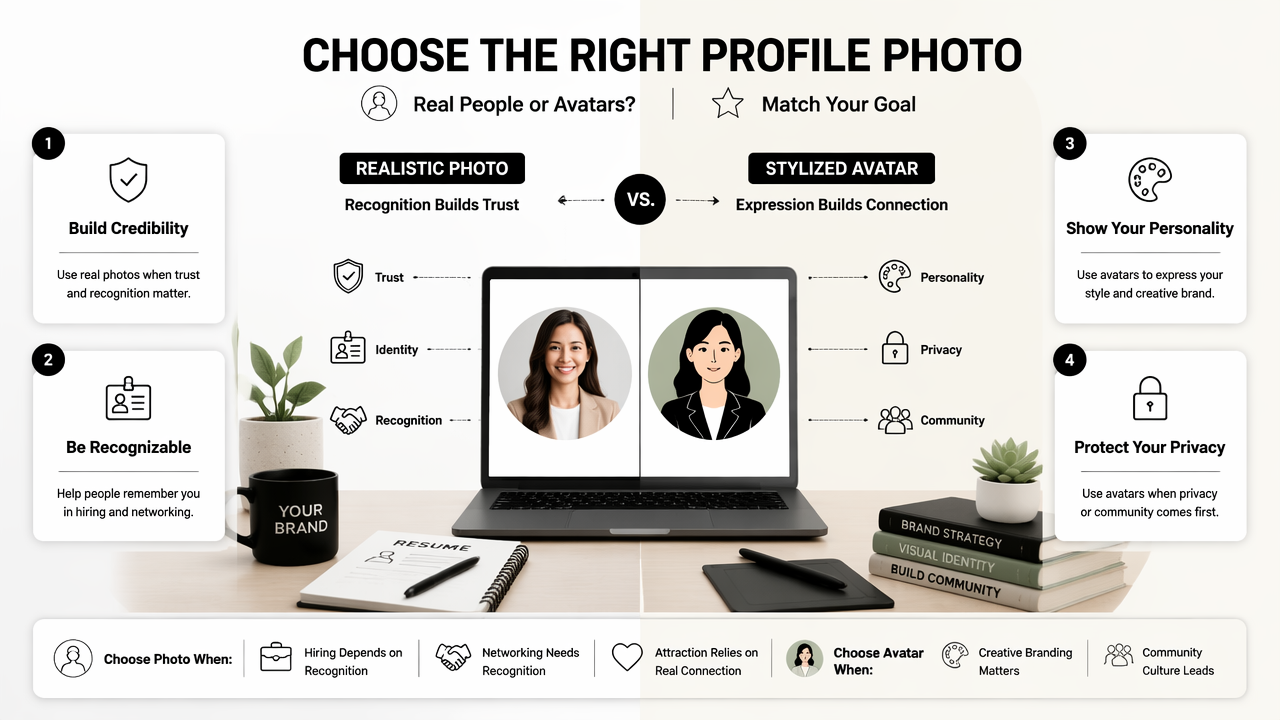
A job seeker, consultant, founder, real estate agent, or remote worker usually needs a realistic image. A gamer, streamer, illustrator, anonymous creator, or community manager may gain more from an avatar.
Simple rule:
- Pick a realistic profile picture for trust-based platforms.
- Pick a stylized avatar for playful or creative spaces.
- Use both when a person has separate professional and creator identities.
- Keep facial likeness consistent across channels when recognition affects results.
- Match the image to the audience expectation, not just the trend.
For LinkedIn content, profile images and post visuals should feel aligned. A professional portrait paired with a clear LinkedIn post AI generator can help a personal brand look consistent across comments, posts, and profile visits.
Best choice by platform and goal
| Use case | Better choice | Why it fits |
|---|---|---|
| LinkedIn profile | AI profile picture generator | Hiring and networking depend on trust |
| Résumé or portfolio | AI profile picture generator | Professional consistency matters |
| Business website | AI profile picture generator | Visitors expect a real founder or team image |
| Dating app | AI profile picture generator | Authenticity and attraction depend on likeness |
| Slack or Teams | Either | Real photos help recognition; avatars add personality |
| Discord or gaming | AI avatar maker | Character identity is normal in those spaces |
| YouTube or TikTok brand | Either | Creators may need a face, mascot, or both |
| Anonymous creator account | AI avatar maker | Privacy can matter more than realism |
Dating apps deserve special care. A realistic AI profile photo should still look like the person who will arrive on the date. An image that looks too polished can create a mismatch, even when the intent is harmless.
How do these tools create images in 2026?
Modern AI image tools usually create profile pictures or avatars by reading uploaded images, learning visible features, applying a model or style, and generating several outputs for selection. Prompt-based systems also let a person define background, mood, wardrobe, lighting, or art style.
- Upload reference images or choose a base template.
- Select a purpose, such as business headshot, cartoon avatar, or creator profile.
- Choose style settings, including lighting, background, pose, or illustration type.
- Generate multiple variations.
- Review for likeness, artifacts, and platform fit.
- Export the best image in the right size or aspect ratio.
Research keeps pushing these systems forward. A 2025 ACM paper by Alicia Guo, Shreya Sathyanarayanan, and Leijie Wang examined how creative writers integrate AI into prompt-based workflows, showing how prompting has become part of modern creative production source.
Safety and authenticity checks
AI-generated identity images sit close to the deepfake debate. Deepfakes are AI-generated or AI-edited images, videos, or audio that may depict real or fictional people. A 2023 Heliyon overview by Anton Firc, Kamil Malinka, and Petr Hanáček examined deepfakes as a threat to speaker and facial recognition systems source.
A separate 2023 study in the International Journal of Human-Computer Studies by Ilkka Kaate, Joni Salminen, and João M. Santos studied how deepfake personas affect user perceptions in a design task source. The takeaway for profile images is practical: realism should not cross into deception.
Good review checklist:
- The face still resembles the real person.
- Skin texture does not look plastic.
- Hands, teeth, glasses, and earrings do not contain visible artifacts.
- Clothing fits the platform and role.
- Backgrounds do not imply false status, location, or credentials.
- The final image does not imitate another identifiable person.
The safest AI profile image is enhanced, not invented. It should improve presentation without changing identity.
Which features matter most in each tool type?
The best features depend on whether the output needs to prove identity or build a persona. Profile picture tools need realism controls, headshot styles, clean backgrounds, and export quality. Avatar makers need style variety, character consistency, templates, and brand flexibility.
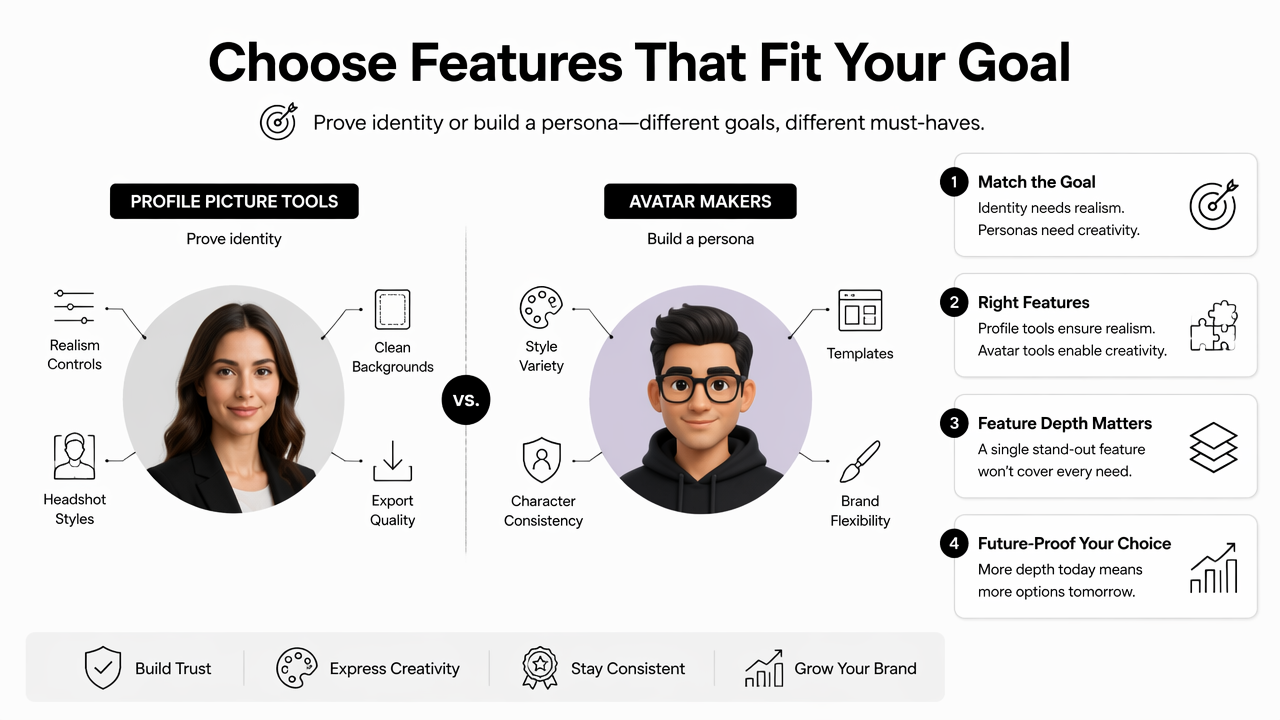
Feature depth matters because a single image often travels across many surfaces. A founder portrait may appear on LinkedIn, a website hero, a pitch deck, and a conference bio. A creator avatar may appear on thumbnails, stories, merchandise, and community icons.
Feature checklist by output type
| Feature | Profile picture generator | Avatar maker |
|---|---|---|
| Likeness control | Essential | Helpful but not always required |
| Wardrobe options | Business, casual, industry-specific | Costume, theme, character style |
| Background control | Office, studio, neutral, outdoor | Fantasy, abstract, branded, illustrated |
| Batch generation | Useful for testing | Useful for style exploration |
| Brand consistency | Strong for business pages | Strong for creators and communities |
| Print design readiness | Useful for badges and speaker sheets | Useful for merch and stickers |
| Video or thumbnail fit | Helpful for creators | Often central to the style system |
| Social templates | Helpful | Essential |
Looktara fits the realistic side of this comparison when the goal is a professional image that can support résumés, founder profiles, and brand assets. The Looktara platform can also sit beside other brand-image workflows, such as a website hero AI generator, a shorts thumbnail AI generator, or an Instagram story AI generator. For business identity beyond faces, a logo AI generator can help keep the visual system coherent.
Digital design and print design should not be treated as afterthoughts. A tiny Slack avatar, a square dating photo, a vertical story, and a printed speaker badge all crop faces differently. The strongest tools provide exports that work across images, photos, videos, audio-led channels with cover art, product pages, and campaign assets.
FAQ: AI profile photos and avatars
AI profile photos and avatars can both improve online presence, but they should be matched to context. The following answers cover the most common decisions for professional, creator, social, and dating use cases.
Is an AI profile picture acceptable for LinkedIn?
An AI profile picture is acceptable for LinkedIn when it accurately represents the person and looks like a professional photo rather than a fantasy render. The safest choice is a clean headshot with natural lighting, realistic skin texture, and business-appropriate clothing. Heavy filters, altered facial structure, or luxury backgrounds can reduce trust.
Is an AI avatar better for privacy?
An AI avatar can be better for privacy because it does not need to reveal an exact face. That makes avatars useful for gaming, anonymous creator brands, forums, and community platforms. Privacy benefits decline when the avatar is generated from recognizable photos or closely matches a real person.
Can the same image work for LinkedIn and dating apps?
The same realistic image can work across platforms only when the tone fits both. LinkedIn usually favors direct eye contact, simple backgrounds, and professional clothing. Dating apps often benefit from warmer expressions and more natural settings. A realistic generator can create different versions while keeping the same recognizable identity.
What will change for AI profile images in 2027?
AI profile images will likely become more platform-aware in 2027, with tools producing separate crops, disclosure options, and brand kits for each channel. Better identity safeguards are also likely as deepfake concerns grow. Realistic headshots and stylized avatars will remain separate choices because they solve different social problems.
Conclusion
The AI profile picture generator vs AI avatar maker decision is simple when the purpose is clear. Realistic profile pictures belong where trust, recognition, hiring, sales, dating, or professional credibility matter. Avatars belong where character, privacy, play, and creative identity carry more value.
For a practical next step, a profile owner should choose the main channel first, define the desired impression, then generate three to five image options that match that context. For professional portraits, Looktara is a strong fit because it focuses on polished identity rather than fictional character design. Visit looktara.com when a credible profile image needs to support a résumé, LinkedIn presence, founder page, or personal brand.
Generated by EarlySEO.com