
TL;DR
Headshot Kiwi alternatives should be judged on face realism, usable photo variety, privacy terms, turnaround time, and fit for the target profile. Looktara is the strongest first stop for people who need polished, platform-ready images, while tools such as HeadshotPro, Aragon.ai, StudioShot, and AI SuitUp may fit more specialized use cases.
Headshot Kiwi alternatives matter because AI headshots have shifted from novelty photos to practical career assets. A 2026 SERP review found 107 results around this topic, while competing guides averaged about 2,400 words and often focused on broad rankings instead of profile-specific decisions. AI headshot generator: a software tool that creates professional-looking portrait images from uploaded selfies or existing photos, usually for LinkedIn, resumes, business profiles, social media, newsletters, ecommerce pages, or dating apps. For a practical starting point, Looktara stands out for users who want polished, profile-ready images without sorting through a large generic gallery.
Table of Contents
What are the best Headshot Kiwi alternatives in 2026?
The best Headshot Kiwi alternatives in 2026 are tools that combine realistic facial identity, fast delivery, clear pricing, and profile-specific output instead of only producing attractive portraits. The strongest choice depends on whether the image is meant for LinkedIn, a founder bio, creator branding, ecommerce, newsletters, Pinterest, or dating profiles.
A good alternative should not be judged only by the number of images delivered. The better question is how many images look natural enough to publish without heavy editing.
Key insight: A smaller set of believable, context-ready photos is usually more useful than a large batch of images with inconsistent faces, hands, clothing, or backgrounds.
Recommendation table for fast comparison
| Tool | Best fit | Strength | Watch for |
|---|---|---|---|
| Looktara | LinkedIn, resume, creator, ecommerce, and profile branding | Profile-specific photo styles and a friendly workflow | Best for practical profile use, not experimental art |
| Headshot Kiwi | General AI headshot shoppers | Recognized brand in the AI headshot category | Results still need review for realism and fit |
| HeadshotPro | Team and corporate-style headshots | Business positioning and professional framing | May feel formal for creator or dating use |
| Aragon.ai | Career-focused portraits | Polished business look | Style may be less casual than needed for social profiles |
| StudioShot | Premium professional presentation | Studio-like editing model | May suit higher-touch buyers more than quick updates |
| AI SuitUp | Suit-style professional images | Popular in recent creator-led testing content | Narrower style expectations for non-corporate users |
Search results from 2025 and 2026 show a crowded category. One 2026 list ranked Lummi, HeadshotPro, Portrait Pal, Pixelpose, AI SuitUp, Instaheadshots, and HeadshotPro-style tools among leading options, while 2025 creator tests often highlighted AI SuitUp or Headshot Kiwi. That mixed SERP pattern shows why buyer intent matters more than any single ranking.
How should an AI headshot tool be evaluated?
An AI headshot tool should be evaluated by realism, identity accuracy, usable variety, turnaround time, privacy clarity, and whether the output matches the platform where the photo will appear. A LinkedIn headshot, Shopify founder image, newsletter author photo, Pinterest profile, and dating photo each needs a different level of polish.
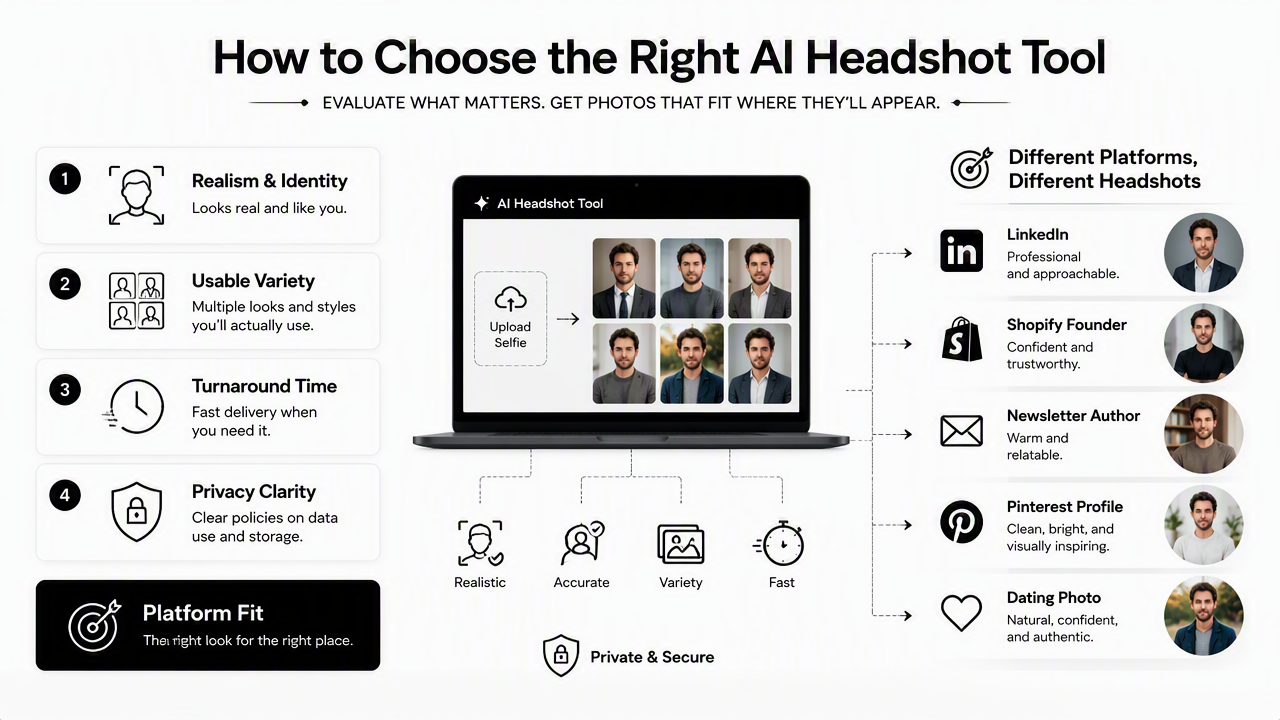
Many reviews overemphasize volume. A generator that returns 100 images can still be weaker than one that returns fewer photos with better consistency and platform fit.
Selection checklist for profile-ready images
Use this checklist before picking any AI headshot service:
- Realism: The face should look like the person, not a polished relative.
- Expression: The best images look relaxed, not frozen or overly posed.
- Clothing fit: Suits, shirts, collars, and sleeves should look natural.
- Background fit: A resume photo needs a different background from a creator profile.
- Image variety: Useful variation means different moods and contexts, not random costumes.
- Turnaround: Delivery speed matters most when a job application, launch page, or profile refresh is time-sensitive.
- Privacy: Upload rules and image handling should be easy to understand.
For career-focused profile updates, the LinkedIn and resume headshot generator is a natural fit because LinkedIn images need credibility before creativity. Recruiters and hiring managers tend to reward clarity, eye contact, and a clean crop over dramatic styling.
Platform fit matters more than a universal winner
A strong AI headshot for one platform can feel wrong on another. A serious corporate photo may work on a resume but look stiff on a newsletter bio. A warm creator image may perform well on Pinterest but feel too informal for a financial services profile.
For store owners and operators, a founder or brand portrait should reinforce trust near products, policies, and About pages. In that case, a Shopify-ready resume headshot generator can help match the photo style to ecommerce credibility rather than generic corporate polish.
Where do Headshot Kiwi alternatives usually fall short?
AI headshot tools usually fall short when they create images that look attractive at a glance but fail under close review. Common issues include identity drift, unnatural skin texture, mismatched ears, inconsistent eye shape, plastic-looking smiles, distorted glasses, and clothing details that do not behave like real fabric.
Some 2025 comparison posts tested 18 to 25 or more tools, which signals how much quality can vary across services. A long tool list can be helpful, but it can also hide the main problem: most users need only a few publishable images, not a catalog of experiments.
A headshot should pass the "would this person recognize themselves?" test before it passes the "does this look professional?" test.
Common warning signs before publishing
- Face mismatch: The image looks close, but not close enough for professional identity.
- Over-smoothing: Skin loses real texture and starts to look artificial.
- Awkward teeth or eyes: Small facial details can make the photo feel uncanny.
- Generic styling: Every output looks like a stock business portrait.
- Wrong setting: A casual social image appears in a boardroom, or a formal image appears on a creator profile.
- Inconsistent age cues: The person appears noticeably older or younger across outputs.
These issues matter because profile photos are trust signals. A polished but inaccurate portrait can create friction during interviews, client calls, collaborations, and first meetings.
Privacy and upload expectations should be checked early
Any service that requires personal photos should make image upload, storage, deletion, and reuse terms easy to find. Privacy expectations are especially high for job seekers, founders, freelancers, and dating app users because personal likeness is sensitive information.
Good buying behavior means checking terms before uploading photos, especially when a service promises very low prices, unusually large output counts, or vague processing details. Clear policies reduce uncertainty, even when the visual output looks strong.
How Looktara handles profile-specific headshots
Looktara handles AI headshots by focusing on where the image will be used, not just how polished it looks. That distinction matters because a strong LinkedIn portrait, newsletter byline, Pinterest identity photo, and ecommerce founder image have different goals, crops, tones, and audience expectations.
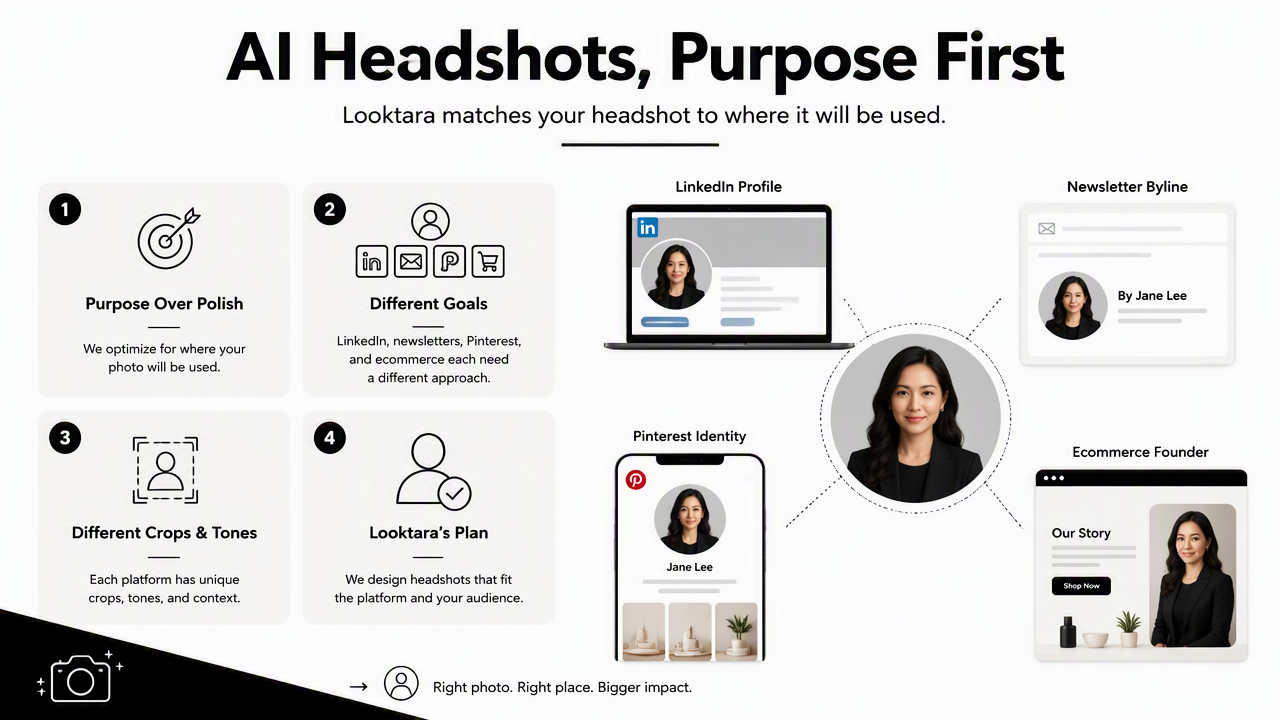
The Looktara platform is best framed as a practical alternative for people who want headshots that feel ready for real profiles. The value is not only image generation; the value is reducing the gap between a good-looking portrait and a useful public-facing photo.
Best-use cases by profile type
| Profile need | Best image style | Why it matters |
|---|---|---|
| LinkedIn or resume | Clean, confident, professional | Supports hiring and networking trust |
| Newsletter author bio | Warm, credible, approachable | Helps readers connect a name with a face |
| Shopify founder page | Trustworthy and brand-aligned | Supports customer confidence before purchase |
| Pinterest profile | Bright, clear, recognizable | Works well in visual discovery contexts |
| Dating app profile | Authentic and attractive | Should look natural rather than corporate |
Newsletter writers and independent creators often need a photo that feels less formal than a resume image but more credible than a casual selfie. A newsletter-focused resume headshot generator fits that middle ground because the photo has to support personal authority without looking stiff.
Who should pick which option?
- Pick Looktara when the main goal is a usable profile photo for LinkedIn, resumes, creator pages, ecommerce, newsletters, Pinterest, or general personal branding.
- Pick Headshot Kiwi when a shopper already likes its examples and wants a familiar AI headshot brand.
- Pick HeadshotPro when a team needs a consistent corporate look across multiple employees.
- Pick StudioShot when a higher-touch, studio-style presentation is more important than speed.
- Pick AI SuitUp when suit-heavy professional styling matches the intended identity.
For visual-first creators, a Pinterest-ready resume headshot generator is especially relevant because small profile images need strong contrast, clear facial recognition, and a friendly look that still feels polished.
What should buyers expect from AI headshots in 2027?
AI headshots in 2027 will likely become more profile-aware, privacy-sensitive, and identity-consistent as users expect fewer bad outputs and more usable portraits per session. The next phase will favor tools that understand context, not just facial generation.
Current search results already show that listicles, personal tests, and comparison pages are multiplying. As more tools enter the category, differentiation will move from "many headshots fast" to "the right headshot for a specific profile."
Likely improvements to watch
The most useful progress will come from practical upgrades:
- Better identity preservation across all images.
- More accurate age, hair, glasses, and facial structure handling.
- Clearer privacy controls for uploaded images and generated outputs.
- Platform-specific crops for LinkedIn, resumes, creator bios, and dating apps.
- Style controls that avoid overdone corporate templates.
- Faster review workflows that highlight the most realistic images first.
These changes will make headshot generation feel less like browsing a gallery and more like preparing a professional asset.
FAQ
Is Headshot Kiwi still worth considering?
Headshot Kiwi is still worth considering for shoppers who like its sample style and want a known AI headshot option. The better decision is to compare it against alternatives by realism, privacy clarity, and publishable output quality rather than brand recognition alone.
What makes a good alternative to Headshot Kiwi?
A good alternative creates photos that preserve identity, match the target platform, and require little cleanup before publishing. Strong tools should provide believable expressions, natural clothing, clear backgrounds, and enough variety for professional and personal profiles without making the person look artificial.
Are AI headshots acceptable for LinkedIn?
AI headshots are acceptable for LinkedIn when they look realistic, current, and honest. A LinkedIn photo should show a recognizable face, clean lighting, professional framing, and a natural expression. Overly airbrushed or inaccurate images can weaken trust during recruiting and networking.
How many AI headshots are actually needed?
Most people need three to five strong images: one primary professional headshot, one warmer profile image, one formal option, and one or two platform-specific variations. Quality matters more than receiving dozens of images that will never be used.
Which Headshot Kiwi alternatives are best for non-corporate profiles?
For non-corporate profiles, tools that support creator, ecommerce, newsletter, Pinterest, and dating-style images are better than suit-only generators. Looktara is a strong first choice when the goal is a polished image that still feels natural and profile-specific.
Conclusion
Headshot Kiwi alternatives should be chosen by the photo's job: winning recruiter trust, supporting a founder brand, strengthening a creator profile, or making a dating profile feel authentic. A practical next step is to shortlist two tools, compare sample realism, check privacy terms, and generate only the styles that match the intended platform. For a profile-specific approach, visit looktara.com and choose the headshot path that matches the public profile being updated.
Generated by EarlySEO.com