
TL;DR
AI headshots match a real face best when the source photos show consistent identity cues: face shape, skin texture, eye spacing, hairline, smile, and everyday styling. The safest workflow is to upload varied, well-lit selfies, ask for faithful reproduction rather than beautification, then audit the final image against real profile photos before posting.
A believable AI headshot is not the most polished image; it is the image that still looks like the same person after lighting, clothing, and background improve. AI headshot: a computer-generated or AI-edited portrait designed to look like a professional profile photo while preserving a person's recognizable facial identity. For career profiles, dating apps, founder pages, and creator accounts, Looktara can help create polished images when the input photos and review process are identity-first. For resume-focused use cases, the fitness Shopify resume headshot AI generator shows how a profile photo can support a more professional personal brand.
Table of Contents
What makes an AI headshot match a real face?
An AI headshot matches a real face when it preserves stable identity markers instead of merely producing a flattering portrait. The important markers are face shape, eye spacing, nose bridge, mouth width, jawline, hairline, skin tone, facial asymmetry, and a normal expression that resembles the person's everyday photos.
Research on visual instruction tuning by Liu, Li, and Wu describes how multimodal systems learn to follow image-based instructions from visual inputs, which explains why source-photo quality strongly affects output fidelity (arXiv, 2023). In plain terms, the model can only preserve what the inputs make clear.
Key insight: accuracy starts before generation. The final headshot rarely fixes missing identity details from weak source images.
Identity fidelity: the degree to which an AI portrait preserves the subject's recognizable facial structure, not just general age, style, or attractiveness.
Professional realism: the degree to which a generated portrait looks suitable for LinkedIn, resumes, company pages, social profiles, or media bios without looking over-smoothed or artificial.
Face-match signals that matter most
The strongest face-match signals are the ones friends, hiring managers, and followers notice instantly. A slightly upgraded outfit usually passes. A changed eye shape, narrowed jaw, different skin tone, or unfamiliar smile often feels wrong.
- Face geometry: cheekbones, chin length, jaw width, forehead height
- Feature spacing: distance between eyes, nose, lips, and brows
- Skin realism: pores, texture, undertones, freckles, fine lines
- Hair identity: hairline, part, curl pattern, beard shape, color
- Expression: natural smile, relaxed mouth, familiar eye openness
- Context fit: clothing and background that match the intended platform
For LinkedIn posts connected to the same personal brand, a matching headshot and content style can make profiles feel more consistent. The fitness Shopify LinkedIn post AI generator is a useful companion when the headshot supports a broader professional presence.
How to choose source selfies for face accuracy
- Pick 8 to 15 recent photos taken within the past year.
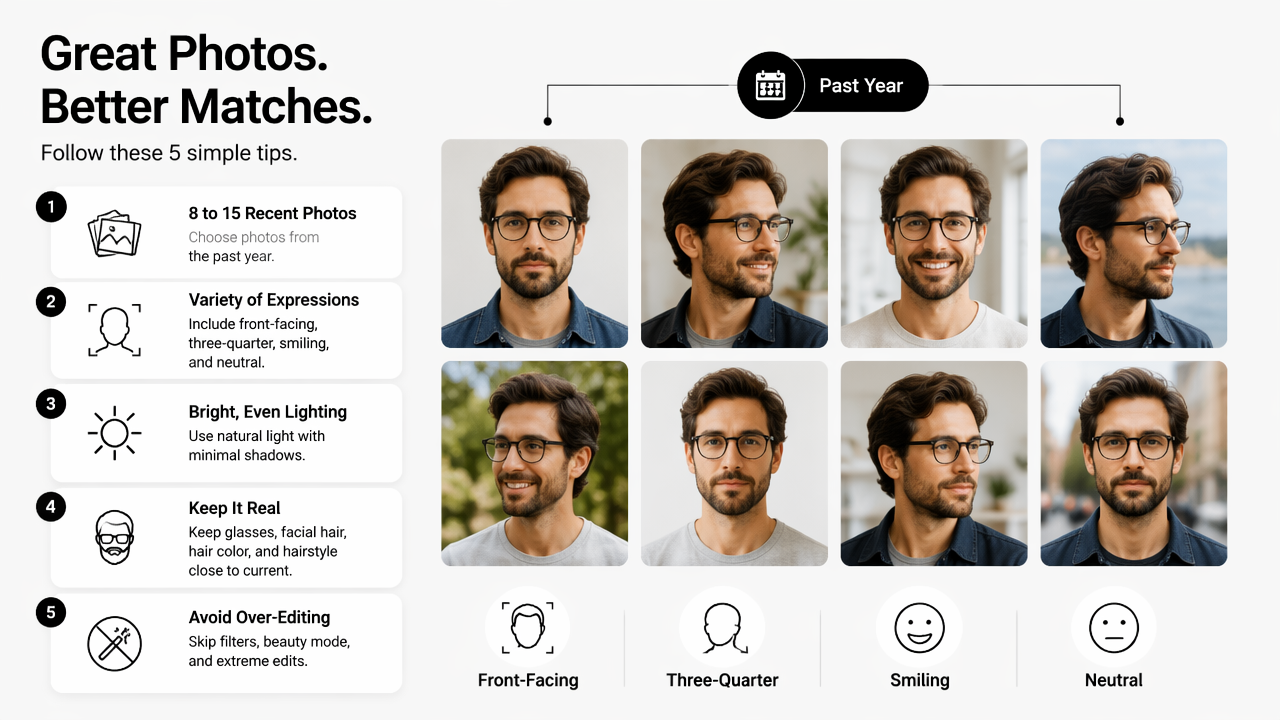
- Include front-facing, three-quarter, smiling, and neutral expressions.
- Use bright, even lighting without heavy shadows across the face.
- Keep glasses, facial hair, hair color, and hairstyle close to current reality.
- Avoid filters, beauty mode, extreme angles, sunglasses, hats, and face-covering objects.
- Add at least three casual photos that resemble normal daily appearance.
Source selection matters because AI systems infer identity patterns across the uploaded set. Miceli and Posada's 2022 work on data production in human-computer interaction examines how data conditions shape AI outputs, a useful reminder that portrait quality depends heavily on the input set (ACM, 2022).
Source photo checklist for realistic AI headshots
A good input set should show the same person clearly under different normal conditions. Variety helps the model separate permanent facial identity from temporary lighting, pose, or camera distortion.
| Input photo type | Why it helps face matching | Avoid |
|---|---|---|
| Front-facing selfie | Captures symmetry, eye spacing, and face shape | Wide-angle closeups that enlarge the nose |
| Three-quarter photo | Helps preserve jawline and cheek depth | Extreme side profiles only |
| Natural smile | Teaches the model the real smile pattern | Forced grin or exaggerated expression |
| Neutral expression | Supports professional headshot options | Blank, tense, or tired expressions |
| Outdoor daylight | Shows realistic skin tone | Harsh noon shadows |
| Indoor soft light | Helps with office-style realism | Colored LED lighting |
A creator or freelancer who also needs profile consistency across social channels can pair a realistic headshot with a matching fitness Instagram profile picture AI generator. The goal is not a separate identity on every platform; the goal is a recognizable version of the same person.
How to prompt and edit for identity consistency
- Ask the system to preserve the exact facial identity, age range, skin tone, face shape, hairline, and expression.
- Specify professional improvements separately: lighting, background, wardrobe, and framing.
- Reject wording that requests a younger, slimmer, more symmetrical, or model-like version.
- Generate several variations, then choose the least altered accurate image.
- Make small edits only after selecting the closest identity match.
Prompts work best when they separate identity from presentation. The safer instruction is not "make this person look better"; it is "keep the same person, improve the headshot setting."
Prompt formula for a faithful AI headshot
A strong prompt gives the model a clear hierarchy: identity first, styling second. The following structure works across many image tools and keeps the request grounded.
- Reference command: use the uploaded photos as the exact facial identity reference.
- Identity lock: preserve face shape, eyes, nose, lips, jawline, skin tone, age, and hairline.
- Style request: create a professional headshot with clean lighting and a simple background.
- Realism guardrail: keep natural skin texture and avoid plastic skin, altered facial proportions, or fashion-model styling.
- Output context: suitable for LinkedIn, resume, company bio, creator profile, or dating profile.
Example prompt: Create a realistic professional headshot using the uploaded images as the exact identity reference. Preserve the person's real face shape, eye spacing, nose, mouth, jawline, skin tone, hairline, age, and natural expression. Improve only lighting, background, framing, and wardrobe. Keep natural skin texture and avoid changing facial proportions.
Bonnefon, Rahwan, and Shariff's 2023 review of AI moral psychology covers trust, responsibility, and social judgment around artificial intelligence (Annual Review of Psychology, 2023). That ethical frame matters for headshots because a professional image should not misrepresent identity in hiring, business, or dating contexts.
The Looktara platform works best when the input set and prompt direction aim for faithful presentation rather than heavy reinvention. For brand owners creating supporting visuals after the headshot, the fitness Instagram product photo AI generator can keep visual content aligned with the same professional style.
How to audit an AI headshot before posting
- Compare the result beside three recent real photos.
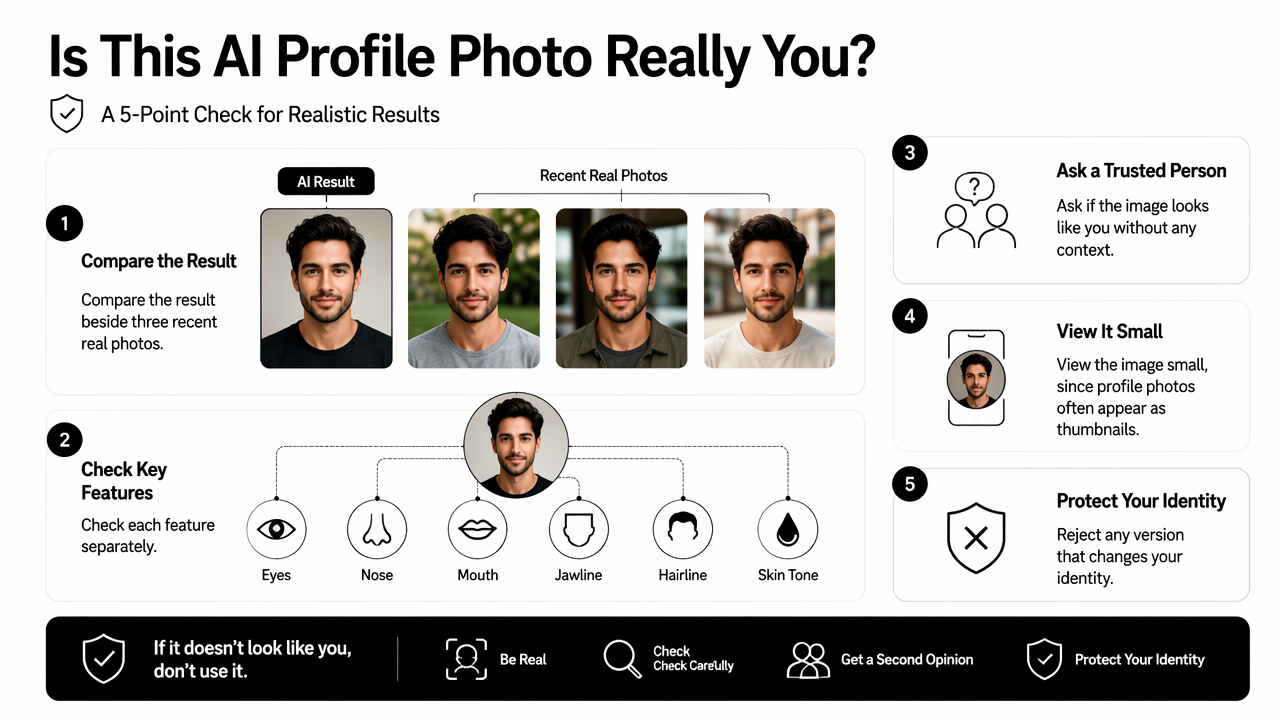
- Check eyes, nose, mouth, jawline, hairline, and skin tone separately.
- Ask a trusted person whether the image looks recognizable without context.
- View the image small, since profile photos often appear as thumbnails.
- Reject any version that changes identity, even if it looks polished.
A headshot should pass a quick recognition test. If the image looks impressive but unfamiliar, it has failed the practical purpose of a profile photo.
Realism audit table for final selection
The final review should focus on specific visible traits, not a general feeling. A structured audit reduces the chance of accepting an image because the suit, lighting, or background looks expensive.
| Audit point | Pass | Revise or reject |
|---|---|---|
| Eyes | Same shape, spacing, and openness | Enlarged, narrowed, different eyelids |
| Nose | Same bridge and tip shape | Slimmed, shortened, or over-defined |
| Mouth | Familiar smile and lip shape | New smile line or changed lip fullness |
| Jaw and chin | Same outline as recent photos | Sharper, slimmer, wider, or longer |
| Skin | Natural texture and accurate undertone | Waxy, blurry, orange, gray, or spotless |
| Hair | Current style, hairline, color | Extra volume, different part, false beard |
| Age | Matches current appearance | Noticeably younger or overly airbrushed |
Common mistakes usually come from chasing an idealized look. Over-smoothing skin, changing weight cues, brightening eyes too much, or using a luxury background that does not match the real professional context can create distrust.
For influencer and creator profiles, the same audit should apply to banners and thumbnails. A realistic portrait can sit beside branded assets from a fitness TikTok banner AI generator without making the person look different from channel to channel.
FAQ: AI headshot realism and face matching
AI headshot realism depends on source images, prompt discipline, and a careful final audit. The most reliable results come from recent photos, natural expressions, identity-preserving instructions, and rejection of outputs that change facial structure.
Can an AI headshot be professional without changing the face?
Yes. A professional AI headshot can improve lighting, background, crop, and wardrobe while preserving the person's real facial identity. The safest target is a studio-style version of an existing appearance, not a redesigned face. Looktara supports that approach when source photos are recent, clear, and consistent.
How many selfies are needed for a realistic headshot?
Most people get better face consistency from a varied set of 8 to 15 recent selfies than from one perfect image. The set should include front-facing and three-quarter angles, neutral and smiling expressions, and both indoor and outdoor lighting. Duplicate photos from the same session add less value than varied, natural examples.
Should wrinkles, pores, scars, or freckles be removed?
Small temporary distractions can be softened, but permanent features should usually remain. Wrinkles, pores, freckles, scars, and smile lines often help recognition. Removing every texture cue can make the headshot look synthetic and can also make the person appear less recognizable in interviews, meetings, or first dates.
What is the best background for a face-accurate AI headshot?
A simple office, studio gray, soft outdoor blur, or clean wall usually works best. Busy backgrounds compete with the face and can make the image feel staged. For professional use, background choice should support the role: corporate, creative, freelance, founder, fitness, or creator branding.
Can the same AI headshot be used everywhere?
One strong headshot can work across LinkedIn, resumes, company bios, and email profiles, but social platforms may need different crops. Dating apps and creator profiles often benefit from a slightly warmer expression. For visual consistency across marketing assets, visit looktara.com and keep the same face, colors, and tone across channels.
Conclusion
Making an AI headshot match a real face comes down to one rule: preserve identity before improving presentation. The best workflow is simple: collect recent varied selfies, use an identity-lock prompt, choose the most recognizable result, and audit facial details before publishing.
For anyone building a professional or creator presence, the next step is to create one accurate headshot, then align the surrounding brand visuals. A matching fitness Instagram infographic AI generator can support educational posts, while Looktara can keep the portrait style polished and consistent. Head to looktara.com when a realistic, recognizable profile image is ready to become part of a broader personal brand.
Generated by EarlySEO.com